Medical Training Platform with Virtual Case Simulation
Medical Training Platform with Virtual Case Simulation
A web-based simulation platform for medical professionals and students to practice clinical decision-making through realistic virtual consultations.
A web-based simulation platform for medical professionals and students to practice clinical decision-making through realistic virtual consultations.
Jump to section
Jump to section
My Design Process
My Design Process
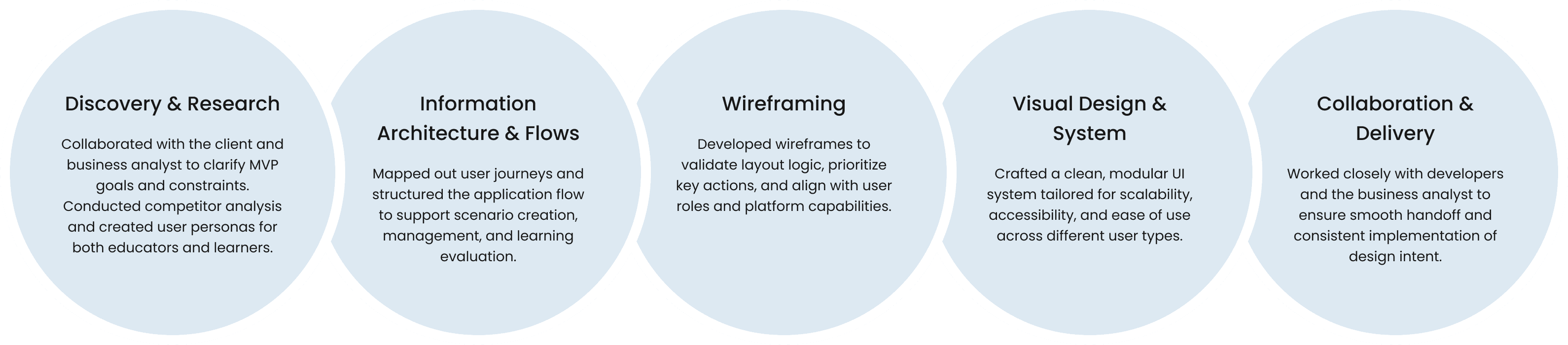
To create this MVP, I followed a step-by-step process for the user experience (UX), which was designed to fit the project's goals, limits, and timeframe. Below is a summary of the design approach I used for the project.
To create this MVP, I followed a step-by-step process for the user experience (UX), which was designed to fit the project's goals, limits, and timeframe. Below is a summary of the design approach I used for the project.
Purpose and Goals
Purpose and Goals
The platform lets users practise interacting with virtual patients using AI, which helps them develop their clinical reasoning skills.
Teachers can create custom medical scenarios, manage student groups, and assign training cases. Students learn by doing. They order tests, make diagnoses and plan treatments.
When it's finished, the system automatically checks how well it's working, and gives information to help learners and teachers. The aim was to create a tool that is both structured and flexible, and which combines medical education and intelligent simulation.
The platform lets users practise interacting with virtual patients using AI, which helps them develop their clinical reasoning skills.
Teachers can create custom medical scenarios, manage student groups, and assign training cases. Students learn by doing. They order tests, make diagnoses and plan treatments.
When it's finished, the system automatically checks how well it's working, and gives information to help learners and teachers. The aim was to create a tool that is both structured and flexible, and which combines medical education and intelligent simulation.
Target audience
Target audience
Learners: medical students, interns, and residents who want to practice and strengthen their diagnostic skills in a safe, interactive setting.
Educators & Institutions: teachers, simulation centers, and hospitals that need flexible tools for scenario creation, group management, and performance evaluation.
Learners: medical students, interns, and residents who want to practice and strengthen their diagnostic skills in a safe, interactive setting.
Educators & Institutions: teachers, simulation centers, and hospitals that need flexible tools for scenario creation, group management, and performance evaluation.
Competitive Analysis
Competitive Analysis
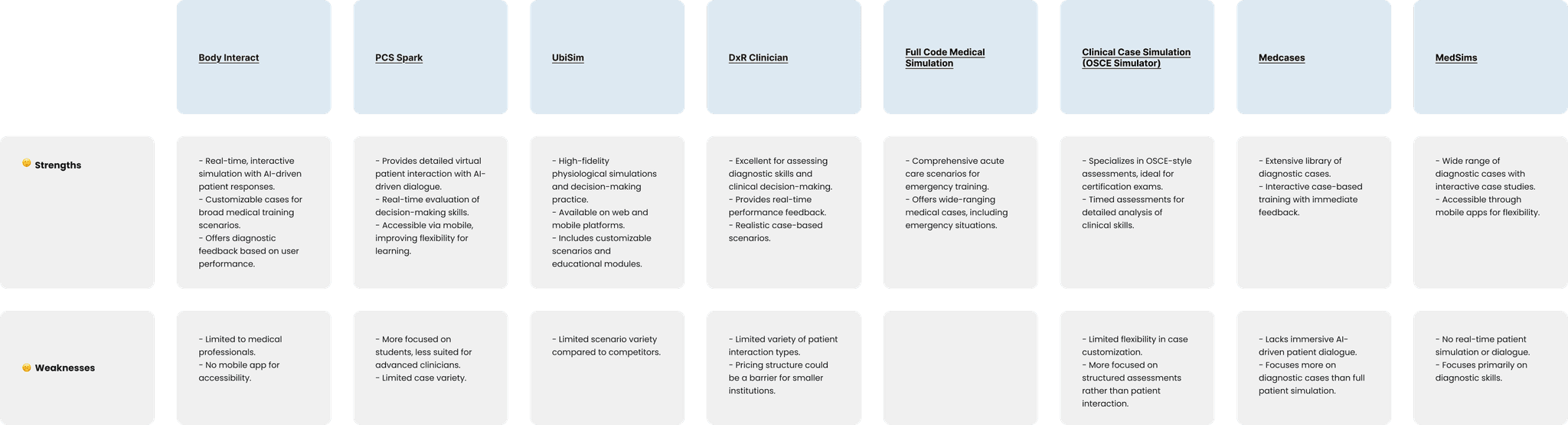
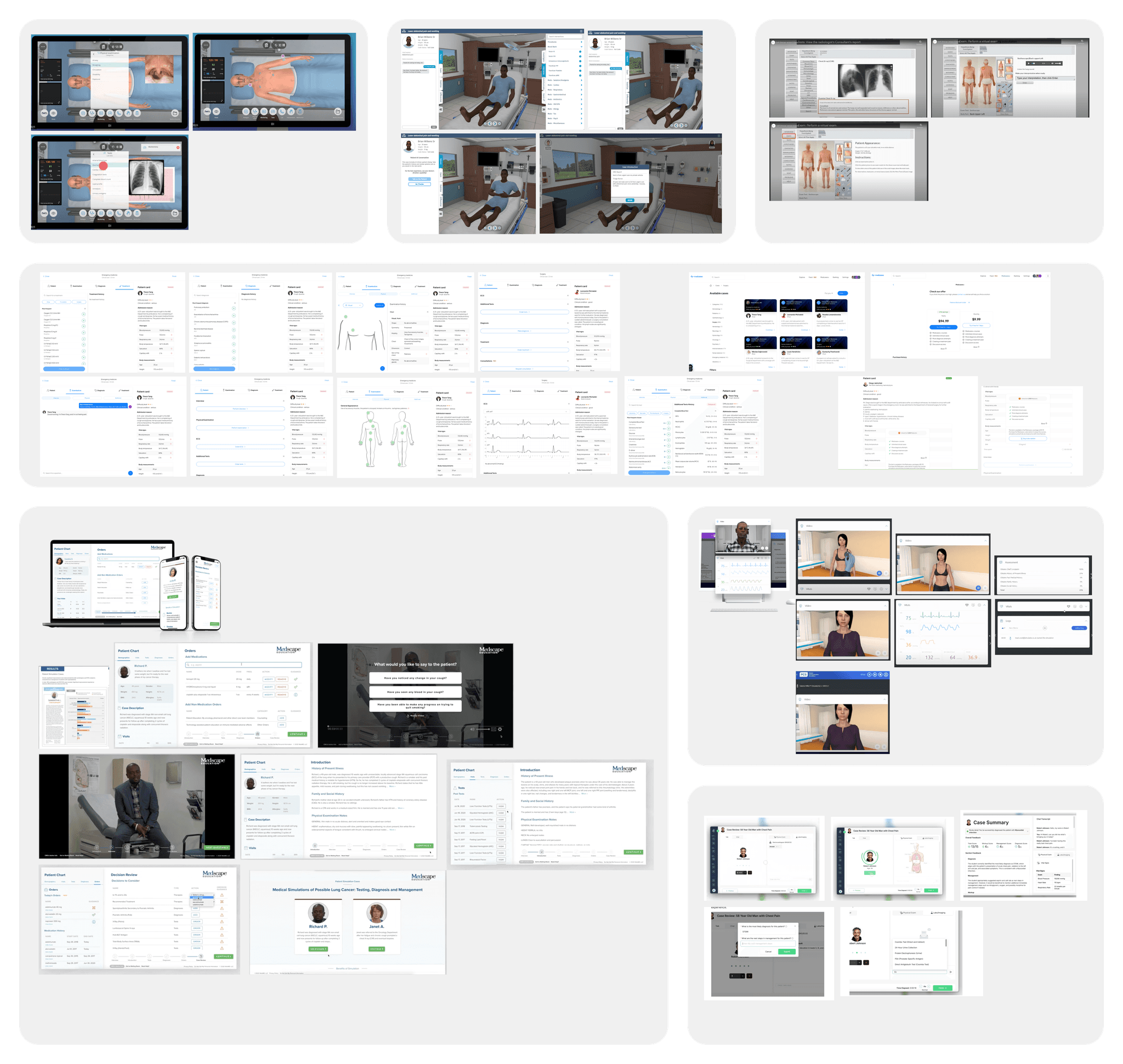
This analysis helped identify the good and bad points of existing virtual patient training platforms. Most tools offer a way to assess what the problem is and provide a set of tasks to get the user to a solution, but many of them don't allow for real-time interaction using artificial intelligence or for the tasks to be created in a flexible way. Some focus on specific subjects or exam formats, while others offer more customisation.
These insights showed a clear opportunity: to design a solution that combines patient dialogue, educator-driven case authoring, group-based management, and learner performance tracking, all within one accessible, scalable platform.
This analysis helped identify the good and bad points of existing virtual patient training platforms. Most tools offer a way to assess what the problem is and provide a set of tasks to get the user to a solution, but many of them don't allow for real-time interaction using artificial intelligence or for the tasks to be created in a flexible way. Some focus on specific subjects or exam formats, while others offer more customisation.
These insights showed a clear opportunity: to design a solution that combines patient dialogue, educator-driven case authoring, group-based management, and learner performance tracking, all within one accessible, scalable platform.
Proposed solution
Proposed solution
Case Creation:
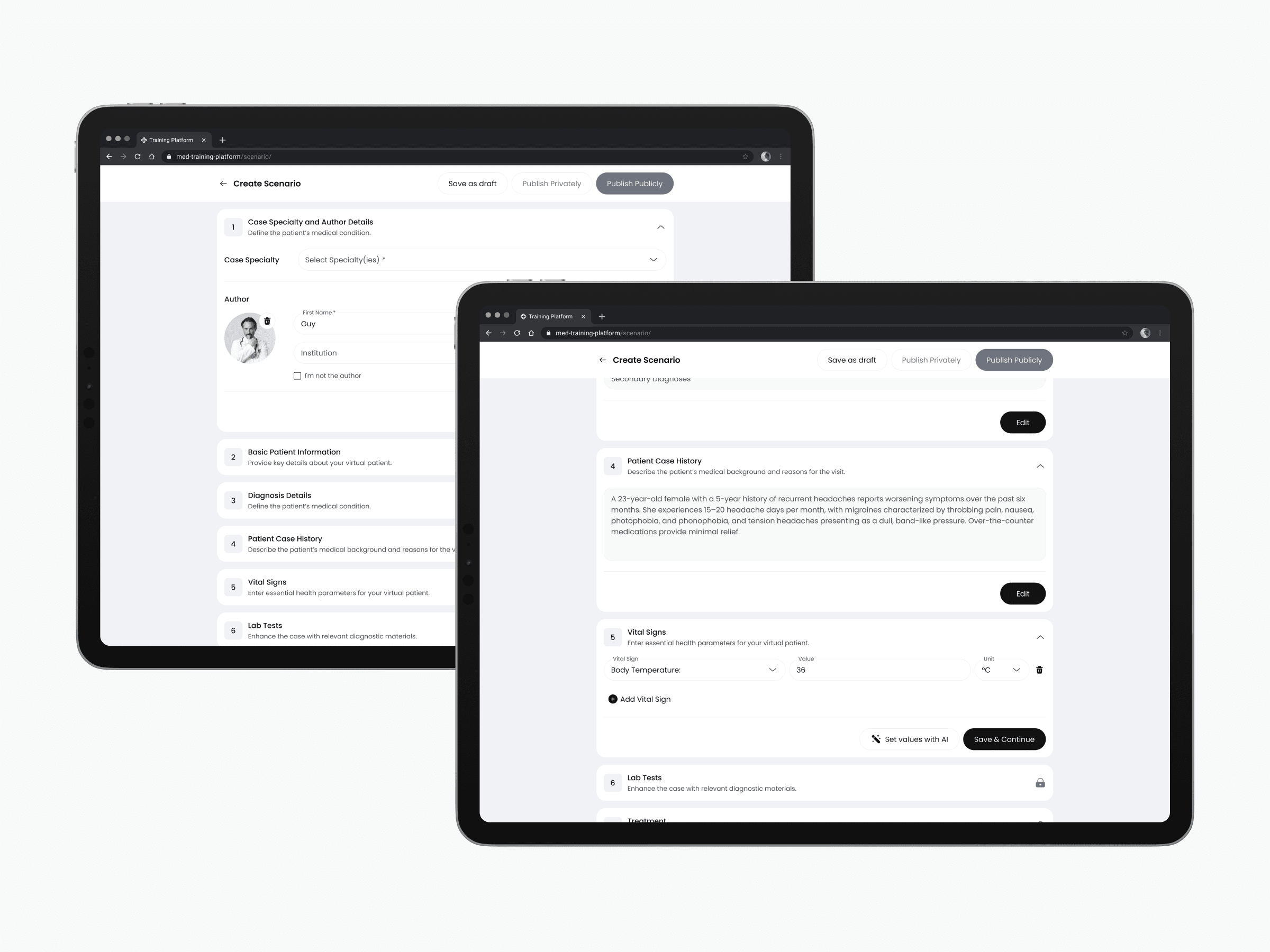
Case authors create realistic clinical scenarios using a step-by-step builder, starting with the patient's details and moving through diagnosis, treatment, and supporting test results.
Each scenario includes predefined clinical information such as vitals, lab values, diagnostic media, and treatment options. During the simulation, learners interact with a virtual patient that is controlled by artificial intelligence. They can ask the patient questions and make independent decisions about the patient's care, which is similar to how doctors do things in real life.
Cases can be saved as drafts, published privately, or made publicly available to all users.
Case authors create realistic clinical scenarios using a step-by-step builder, starting with the patient's details and moving through diagnosis, treatment, and supporting test results.
Each scenario includes predefined clinical information such as vitals, lab values, diagnostic media, and treatment options. During the simulation, learners interact with a virtual patient that is controlled by artificial intelligence. They can ask the patient questions and make independent decisions about the patient's care, which is similar to how doctors do things in real life.
Cases can be saved as drafts, published privately, or made publicly available to all users.
Case Creation:
Case Creation:
Case Library:
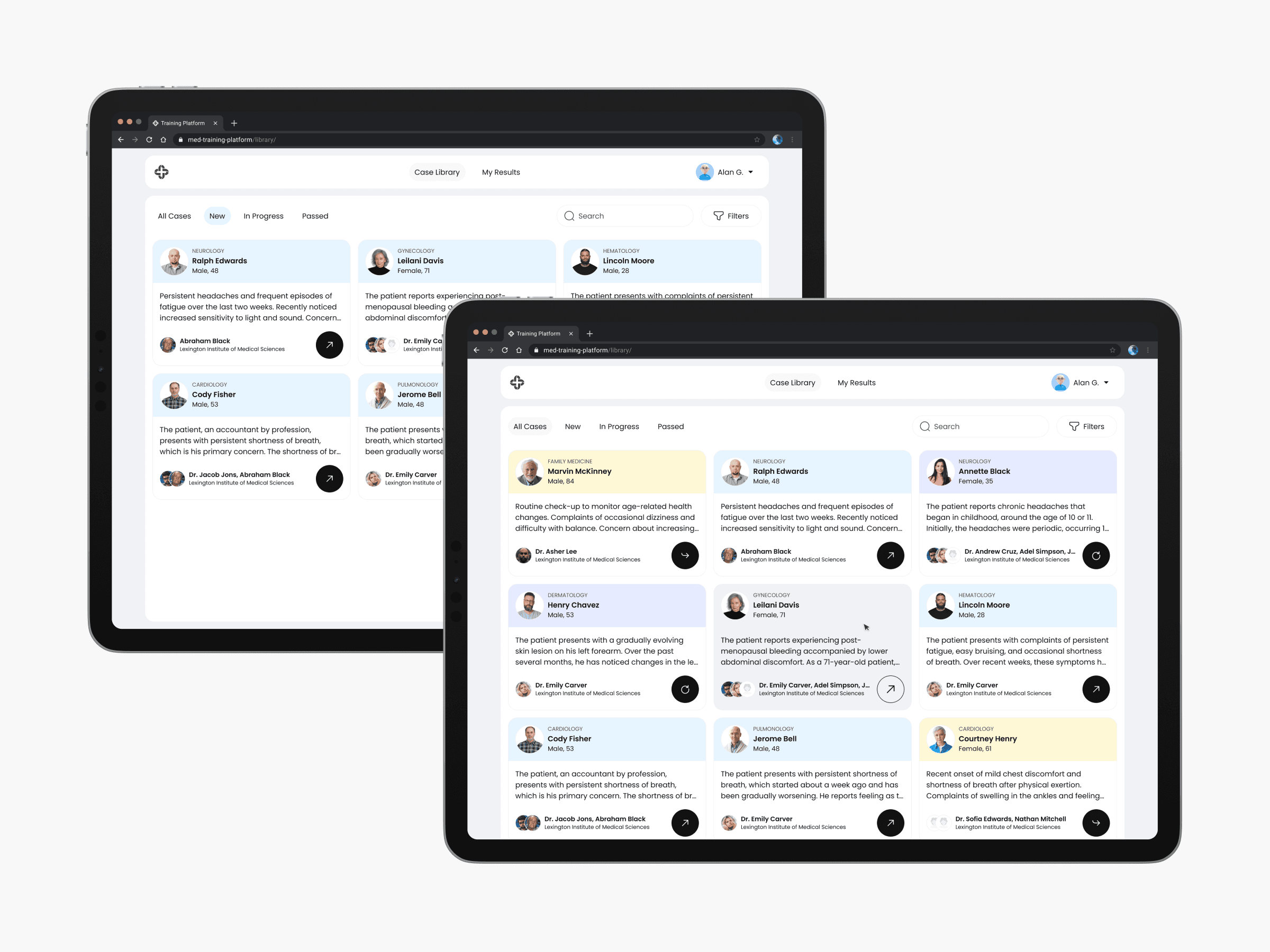
This is the main dashboard where learners access all available virtual patient scenarios.
Each case card displays key information like patient details, specialty, and a brief summary. Users can search, filter by progress status, and quickly open any case for simulation.
The interface is designed to help learners easily navigate, prioritize, and track their training.
This is the main dashboard where learners access all available virtual patient scenarios.
Each case card displays key information like patient details, specialty, and a brief summary. Users can search, filter by progress status, and quickly open any case for simulation.
The interface is designed to help learners easily navigate, prioritize, and track their training.
Case Library:
Case Library:
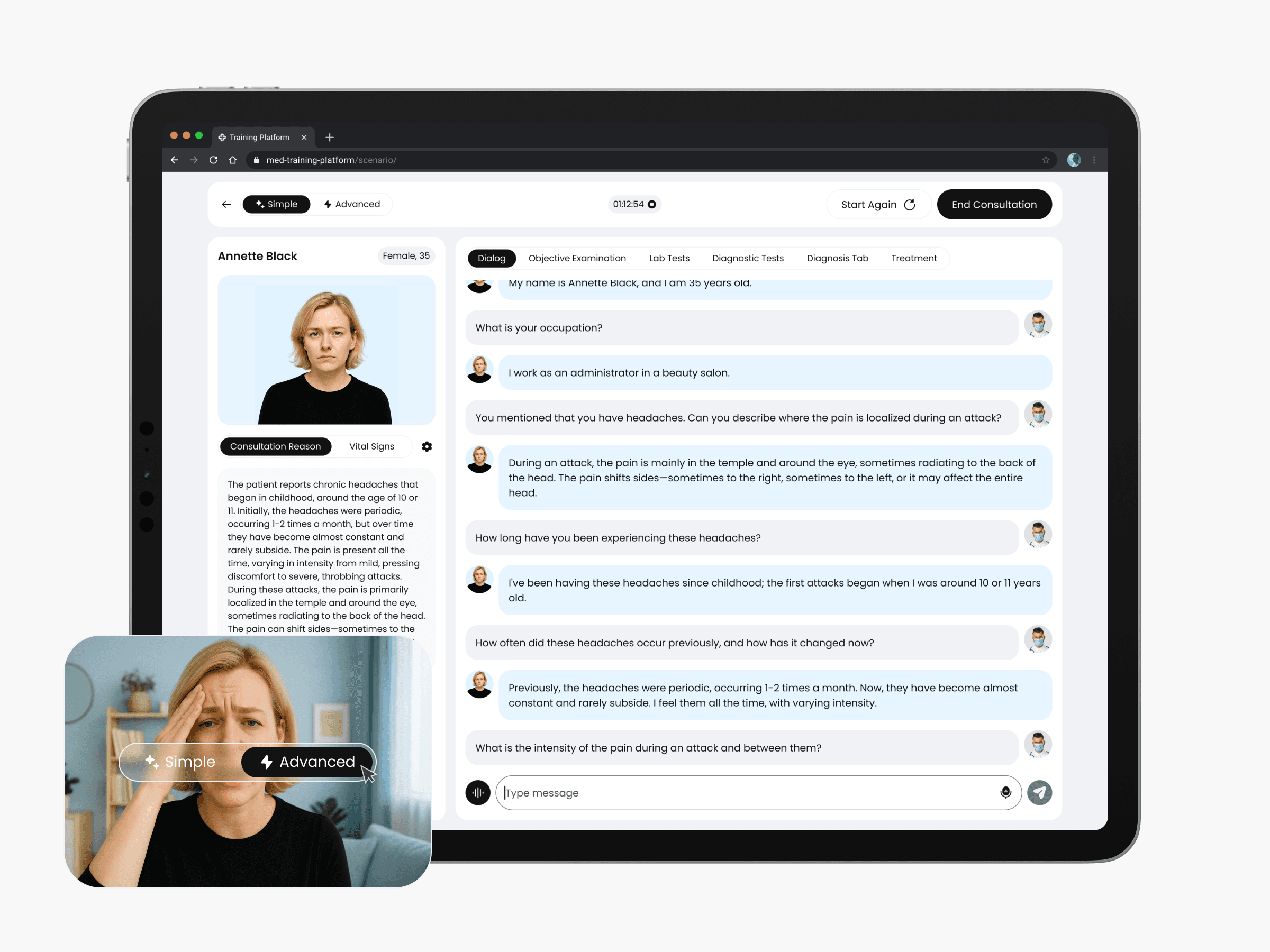
Dialog with Virtual Patient:
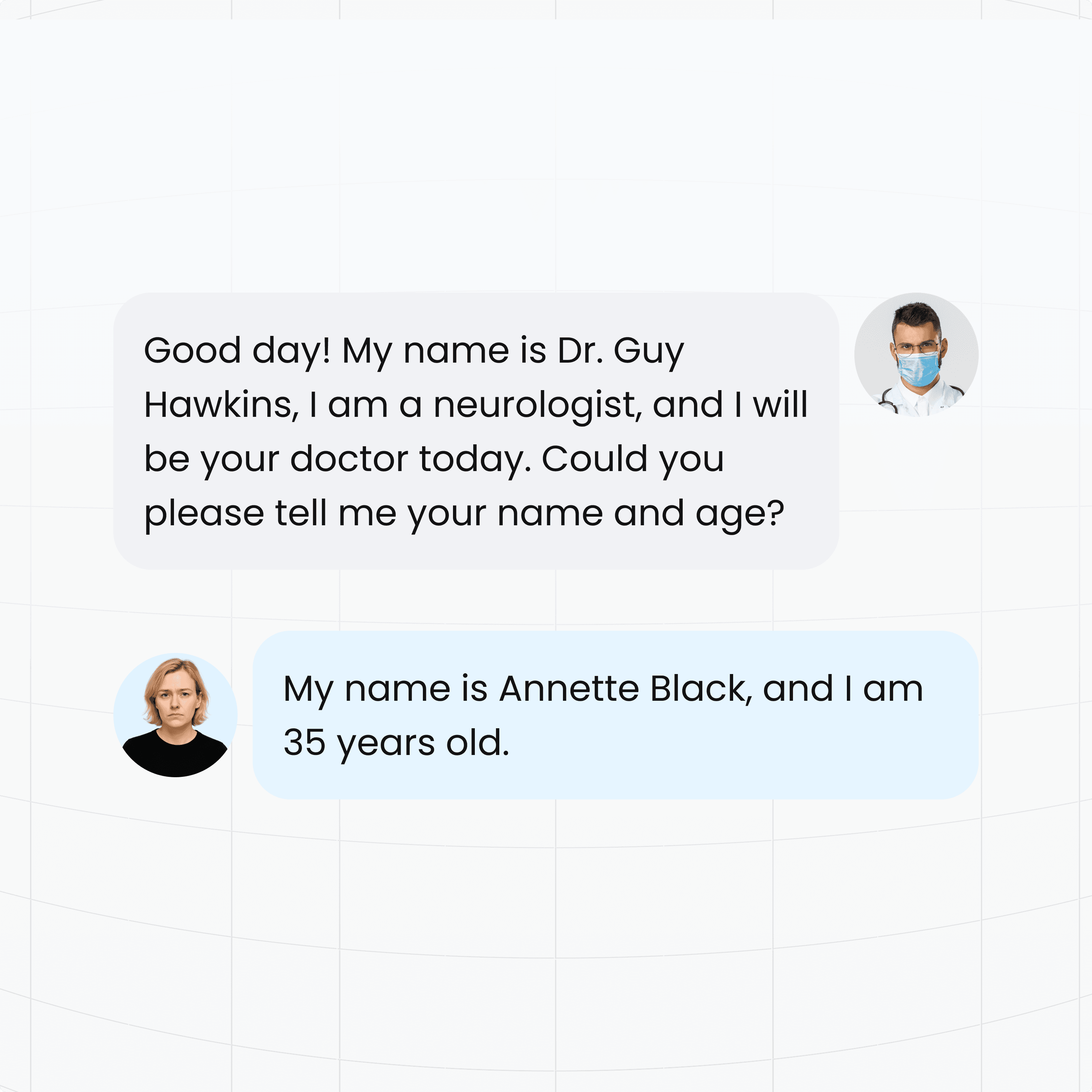
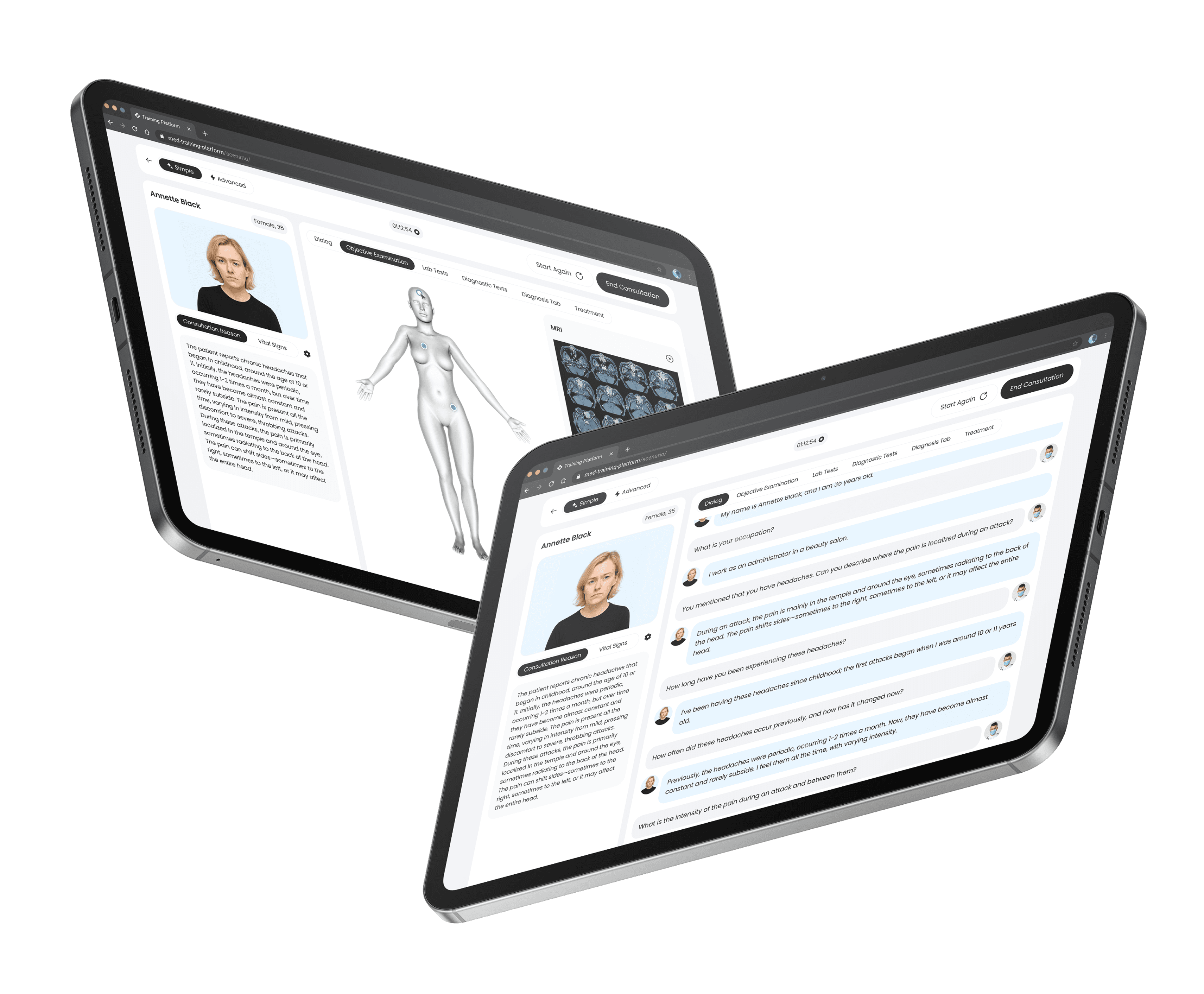
The consultation starts on the Dialog tab, where the user talks to a virtual patient that is powered by AI. In Simple mode, patients respond via text. In Advanced mode, they respond with a synthesised voice, simulating a real clinical conversation.
Learners ask questions to find out about the patient's medical history and symptoms. At any time, they can check the patient's vital signs to understand the context. When they have collected enough information and looked at other tabs, if they want to, they can finish the consultation and send it off to be checked.
The consultation starts on the Dialog tab, where the user talks to a virtual patient that is powered by AI. In Simple mode, patients respond via text. In Advanced mode, they respond with a synthesised voice, simulating a real clinical conversation.
Learners ask questions to find out about the patient's medical history and symptoms. At any time, they can check the patient's vital signs to understand the context. When they have collected enough information and looked at other tabs, if they want to, they can finish the consultation and send it off to be checked.
Dialog with Virtual Patient:
Dialog with Virtual Patient:
Objective Examination
This tab allows learners to explore physical findings using an interactive 3D patient model. If the scenario includes objective data, markers appear on relevant body areas. Clicking a marker reveals detailed descriptions, visuals and clinical context.
The feature simulates a real-world examination, helping users analyze symptoms spatially and interpret attached findings as part of the diagnostic process.
This tab allows learners to explore physical findings using an interactive 3D patient model. If the scenario includes objective data, markers appear on relevant body areas. Clicking a marker reveals detailed descriptions, visuals and clinical context.
The feature simulates a real-world examination, helping users analyze symptoms spatially and interpret attached findings as part of the diagnostic process.
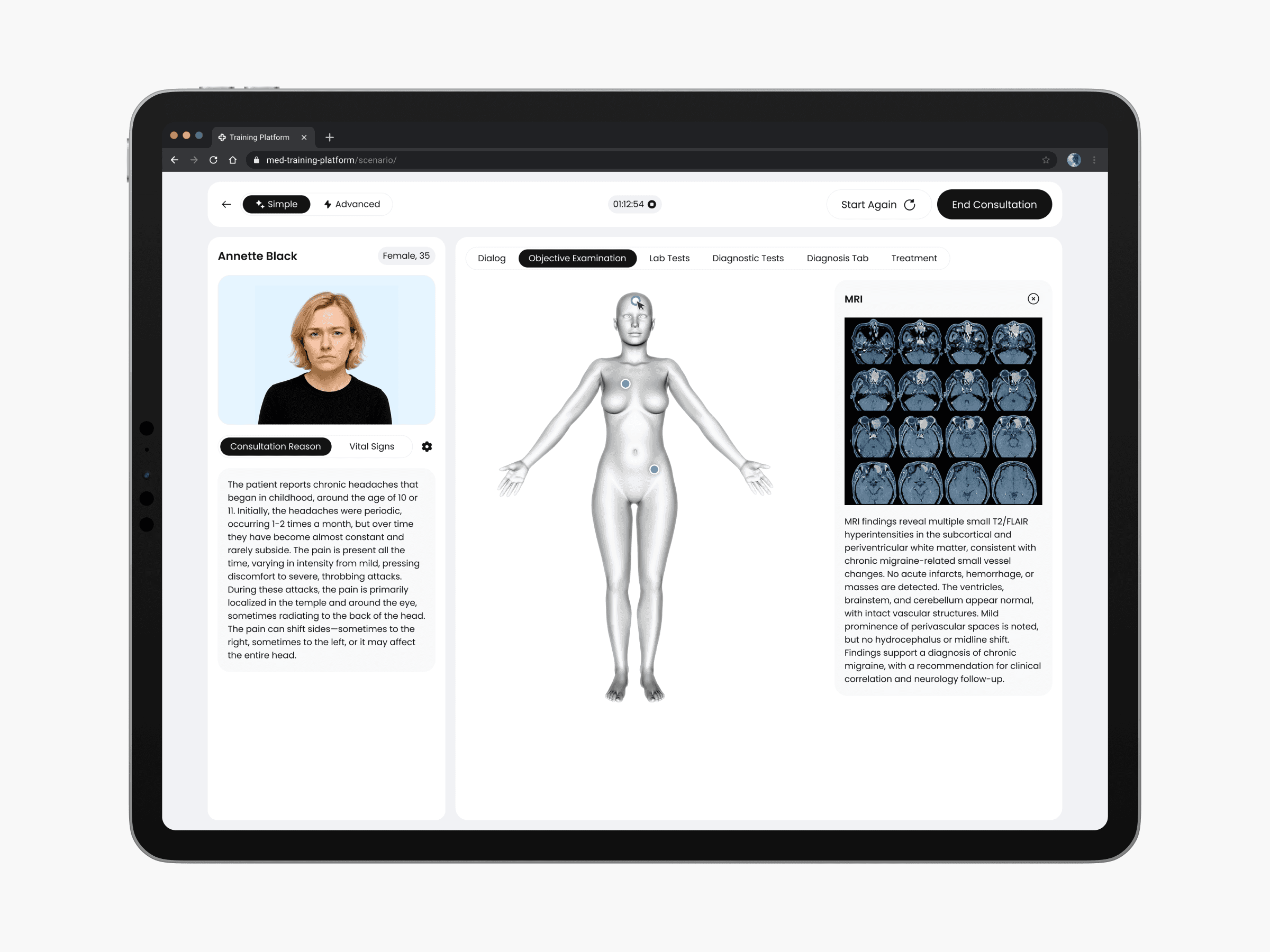
Objective Examination
Objective Examination
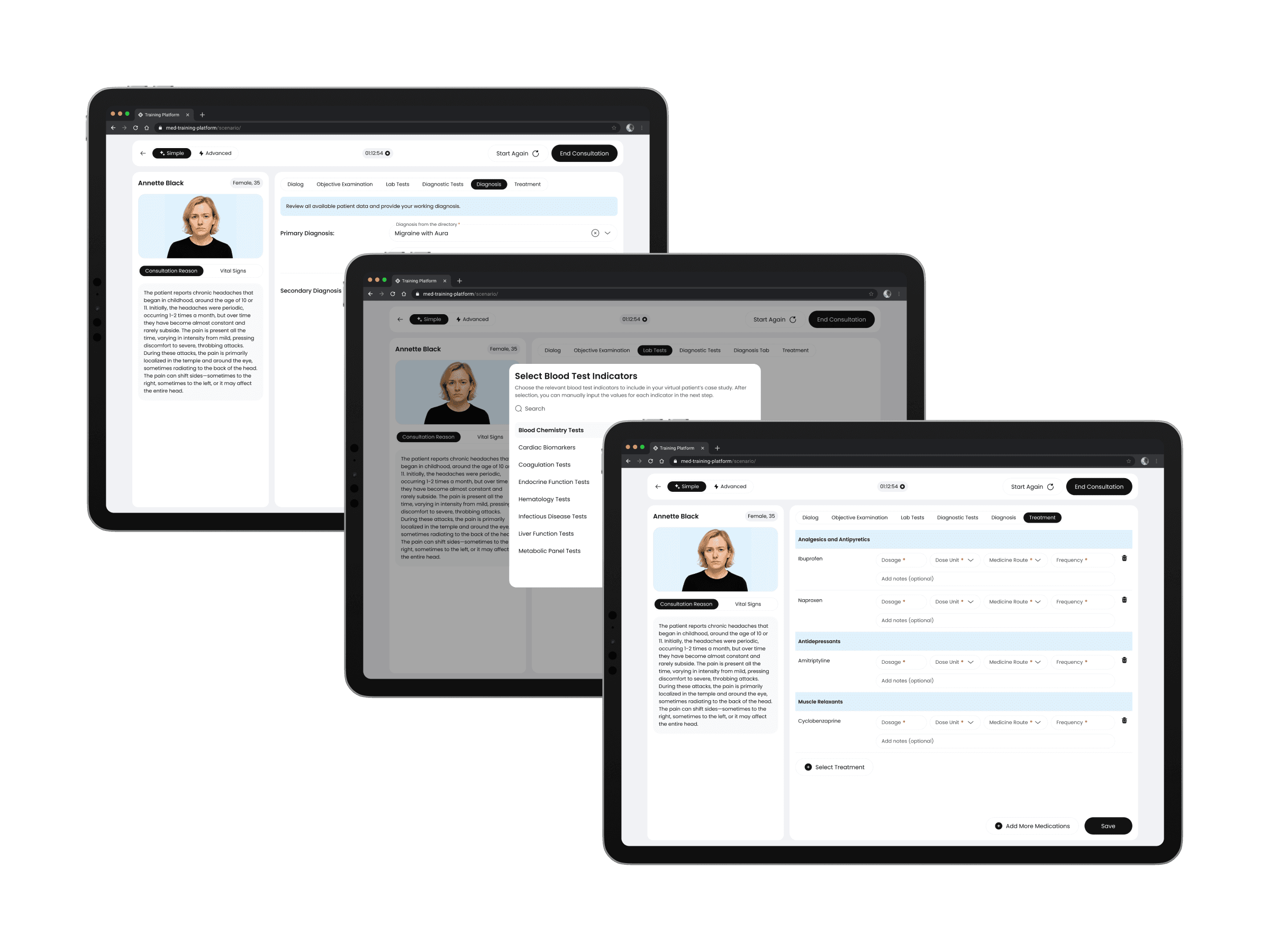
Diagnostic & Treatment Workflow:
After interacting with the virtual patient, learners go through the final stages of the scenario. This means reviewing lab and diagnostic test data, entering a diagnosis and assigning treatment.
These tabs are based on real clinical decision-making, allowing users to understand test results, support their conclusions, and create a treatment plan.
After interacting with the virtual patient, learners go through the final stages of the scenario. This means reviewing lab and diagnostic test data, entering a diagnosis and assigning treatment.
These tabs are based on real clinical decision-making, allowing users to understand test results, support their conclusions, and create a treatment plan.
Diagnostic & Treatment Workflow:
Diagnostic & Treatment Workflow:
Reflection
Reflection
Working on this virtual patient training platform was a meaningful and professionally valuable experience. Our job was to find the best way to make the client's idea real. We had to think about what they wanted to achieve, what was technically possible, and how much they could spend, because this version is just a first trial.
We worked with the business analyst and developers to create the main functions, focusing on a clear structure and a user-friendly experience.
It was a valuable process of turning a complex vision into a working solution, and I'm excited to see how the project will grow and evolve in the future.
Working on this virtual patient training platform was a meaningful and professionally valuable experience. Our job was to find the best way to make the client's idea real. We had to think about what they wanted to achieve, what was technically possible, and how much they could spend, because this version is just a first trial.
We worked with the business analyst and developers to create the main functions, focusing on a clear structure and a user-friendly experience.
It was a valuable process of turning a complex vision into a working solution, and I'm excited to see how the project will grow and evolve in the future.