MVP: Home Medicine Cabinet App
MVP: Home Medicine Cabinet App
An intuitive app that helps users organize their medications, track quantities and expiry dates, and access important instructions. Whether for personal use or caregiving, the app offers simple solutions.
An intuitive app that helps users organize their medications, track quantities and expiry dates, and access important instructions. Whether for personal use or caregiving, the app offers simple solutions.
Download on the
App Store
GET IT ON

Purpose and Goals
Purpose and Goals
The Medicine Cabinet App was created to make managing home medications simple and reliable. By turning the traditional medicine cabinet into a digital tool, users can log and organize their medications, track quantities and expiry dates, and quickly access digital instructions.
The app also supports personalized schedules and treatment plans, helping users stick to their routines and avoid missed doses. Its clean and user-friendly design saves time, reduces the risk of taking expired medications, and gives users confidence and control over their health.
The Medicine Cabinet App was created to make managing home medications simple and reliable. By turning the traditional medicine cabinet into a digital tool, users can log and organize their medications, track quantities and expiry dates, and quickly access digital instructions.
The app also supports personalized schedules and treatment plans, helping users stick to their routines and avoid missed doses. Its clean and user-friendly design saves time, reduces the risk of taking expired medications, and gives users confidence and control over their health.
Target audience
Target audience
Older Adults: Particularly those aged 60 and above who may be managing multiple chronic health conditions and medications.
Caregivers: Family members or professional caregivers responsible for managing medication schedules for older adults or individuals with complex health needs.
Adults of All Ages: Individuals of any age managing multiple medications for chronic conditions or seeking to improve medication adherence.
Older Adults: Particularly those aged 60 and above who may be managing multiple chronic health conditions and medications.
Caregivers: Family members or professional caregivers responsible for managing medication schedules for older adults or individuals with complex health needs.
Adults of All Ages: Individuals of any age managing multiple medications for chronic conditions or seeking to improve medication adherence.
Competitive Analysis
Competitive Analysis
To better understand how similar challenges are being addressed, I analyzed competitor apps and their features. This process helped identify key strengths and gaps in existing solutions.
To better understand how similar challenges are being addressed, I analyzed competitor apps and their features. This process helped identify key strengths and gaps in existing solutions.
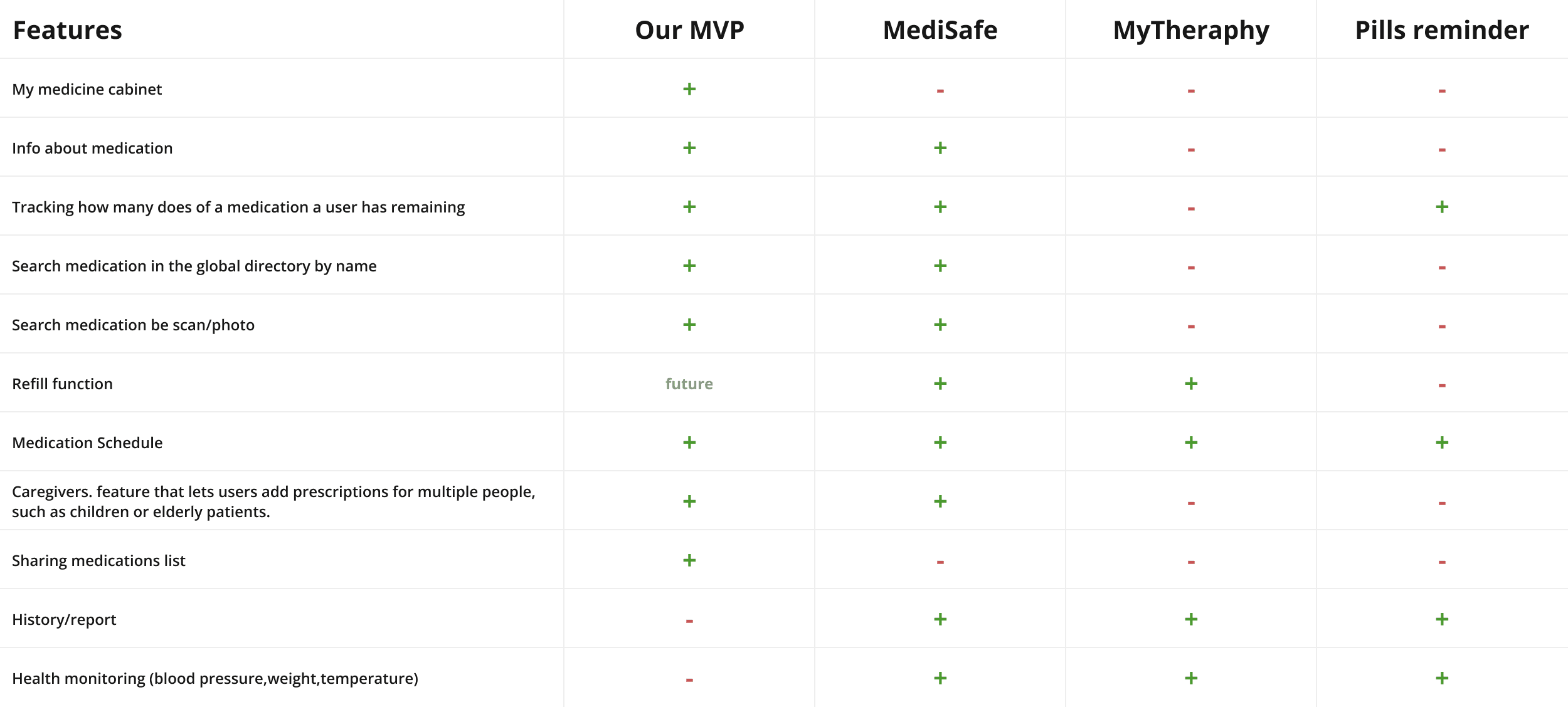
Our competitor analysis revealed that most existing apps focus heavily on medication schedules and reminders but overlook a key aspect it's helping users organize and manage their entire home medicine cabinet, including first aid essentials. Another common frustration is that many apps require users to add a medication to their treatment plan before they can even read its instructions, making it harder to quickly access important details.
With our MVP, we’re taking a more user-friendly and flexible approach. Instead of just managing reminders, our app makes it easy to track all medications, check stock levels, monitor expiration dates, and instantly access instructions, no extra steps required. These enhancements ensure a more flexible and user-friendly experience, addressing the broader needs of users managing home medicine supplies and first aid essentials.
Our competitor analysis revealed that most existing apps focus heavily on medication schedules and reminders but overlook a key aspect it's helping users organize and manage their entire home medicine cabinet, including first aid essentials. Another common frustration is that many apps require users to add a medication to their treatment plan before they can even read its instructions, making it harder to quickly access important details.
With our MVP, we’re taking a more user-friendly and flexible approach. Instead of just managing reminders, our app makes it easy to track all medications, check stock levels, monitor expiration dates, and instantly access instructions, no extra steps required. These enhancements ensure a more flexible and user-friendly experience, addressing the broader needs of users managing home medicine supplies and first aid essentials.
Proposed solution
Proposed solution
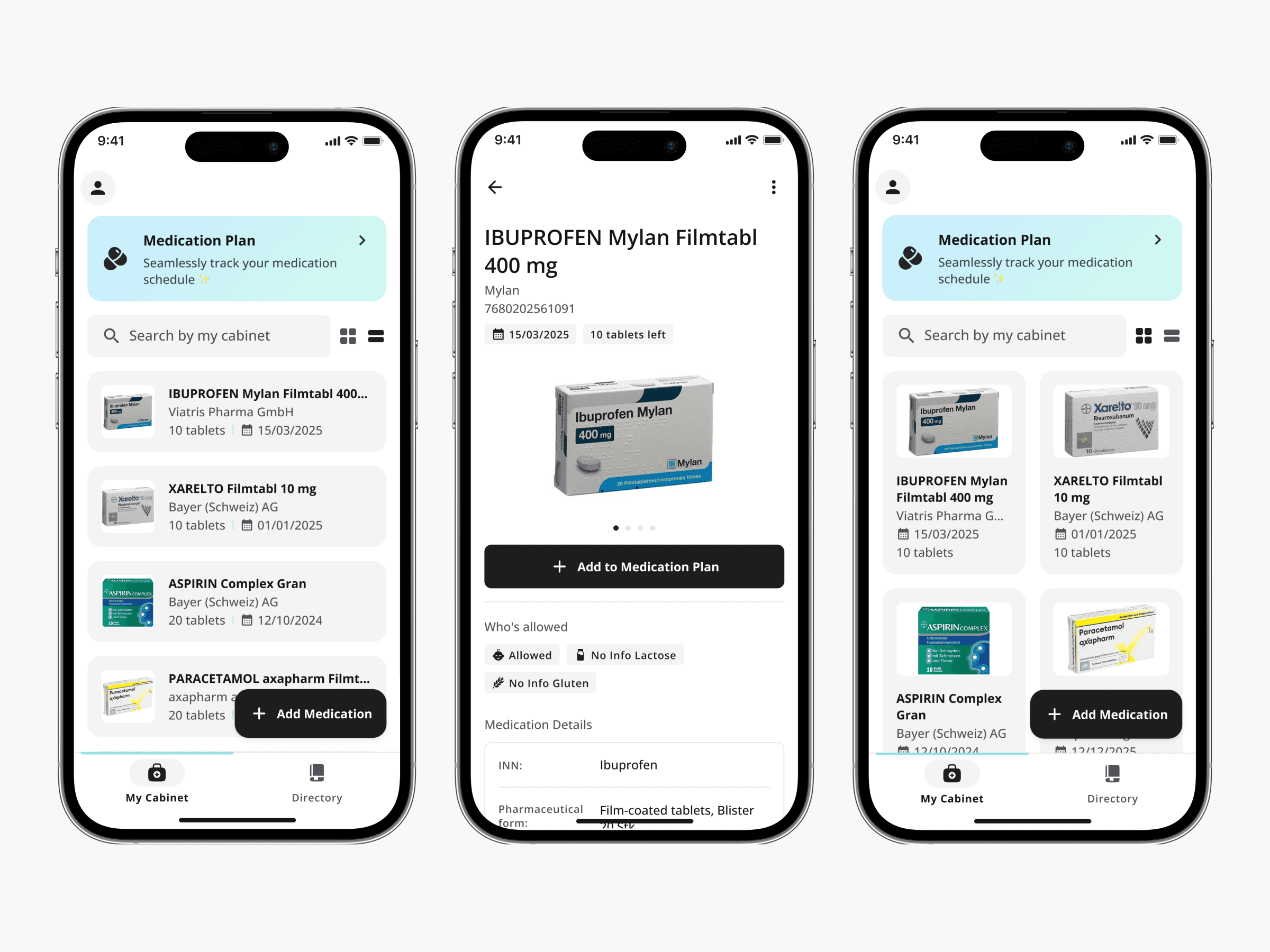
Medication Cabinet:
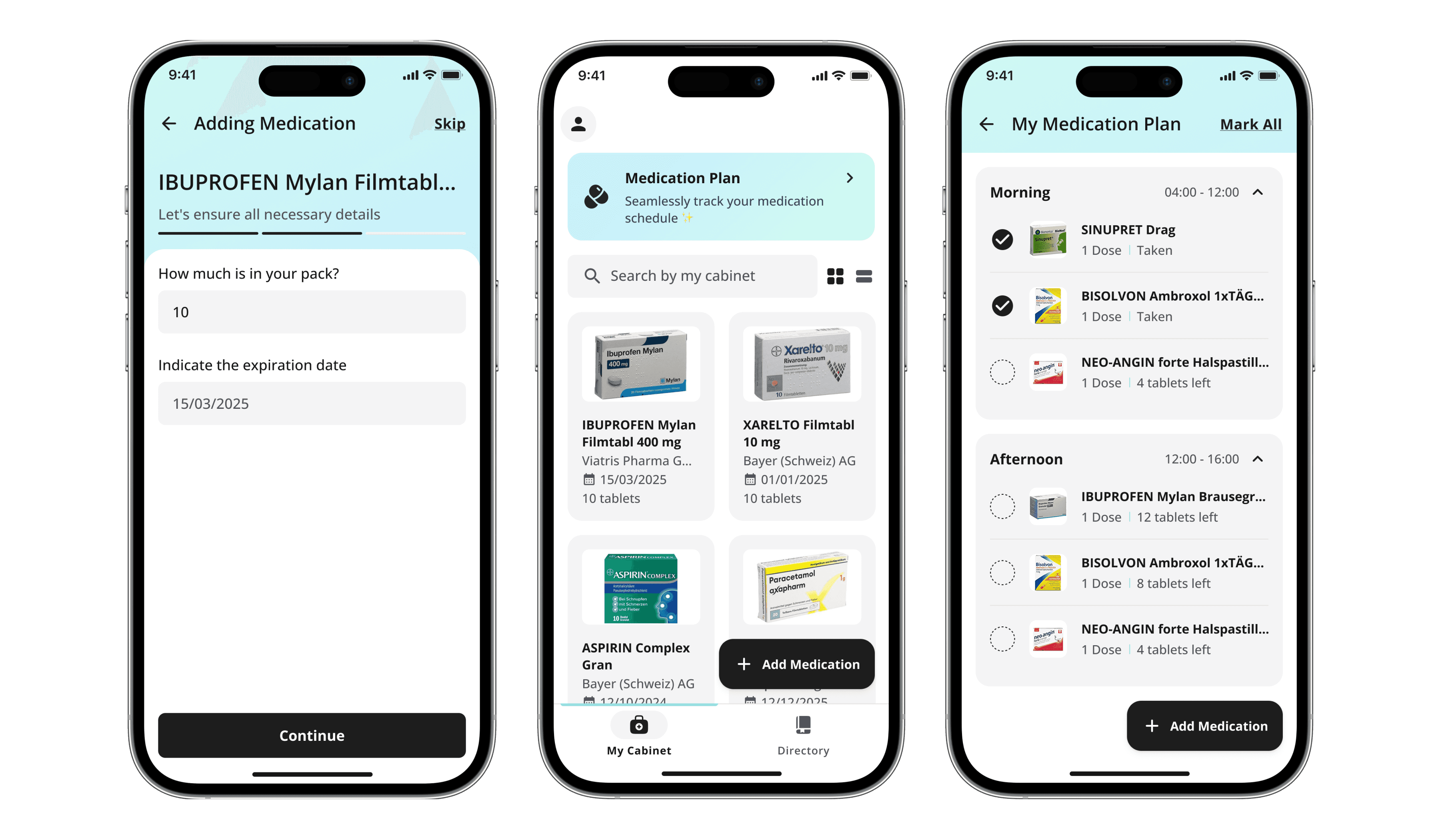
Here, users have a centralized view of their medications, complete with essential details like expiration dates and current quantities. This screen makes it easy for users to see when they need to refill their medications and to follow their treatment plans.
Users can easily find all the information they need about a drug and what to do if they have any problems. This helps them to look after their health without worrying.
Here, users have a centralized view of their medications, complete with essential details like expiration dates and current quantities. This screen makes it easy for users to see when they need to refill their medications and to follow their treatment plans.
Users can easily find all the information they need about a drug and what to do if they have any problems. This helps them to look after their health without worrying.
Medication Cabinet:
Medication Cabinet:
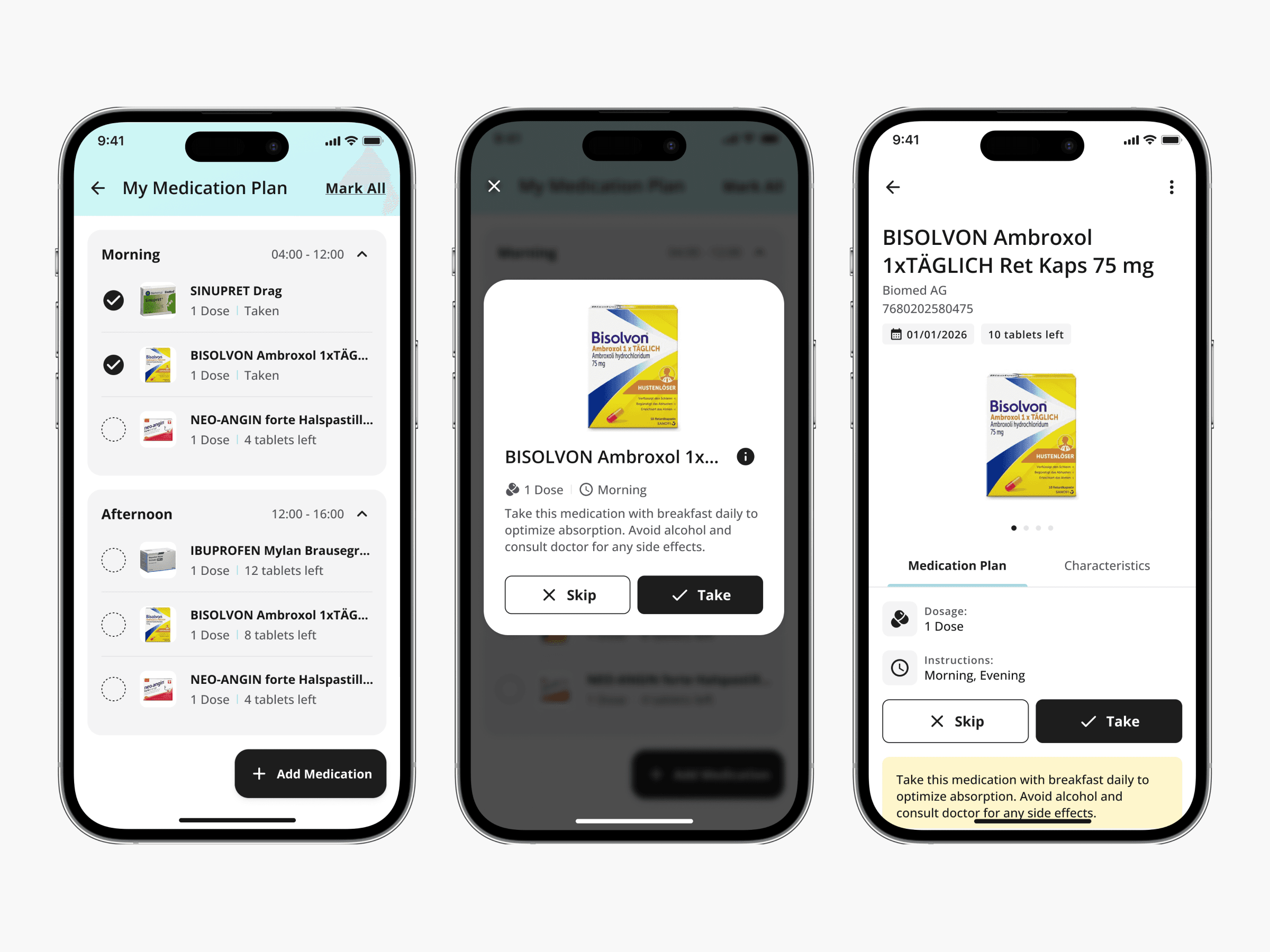
Medication Schedule:
The Medication Schedule helps users stay on track with their treatment plan. After adding medications and selecting the frequency, dose, and time of administration, users can easily view and manage their personalized medication schedule.
In the MVP, this feature offers a simple view of the user’s medication plan, but future updates will include a fully developed calendar with reminders for a more comprehensive experience.
The Medication Schedule helps users stay on track with their treatment plan. After adding medications and selecting the frequency, dose, and time of administration, users can easily view and manage their personalized medication schedule.
In the MVP, this feature offers a simple view of the user’s medication plan, but future updates will include a fully developed calendar with reminders for a more comprehensive experience.
Medication Schedule:
Medication Schedule:
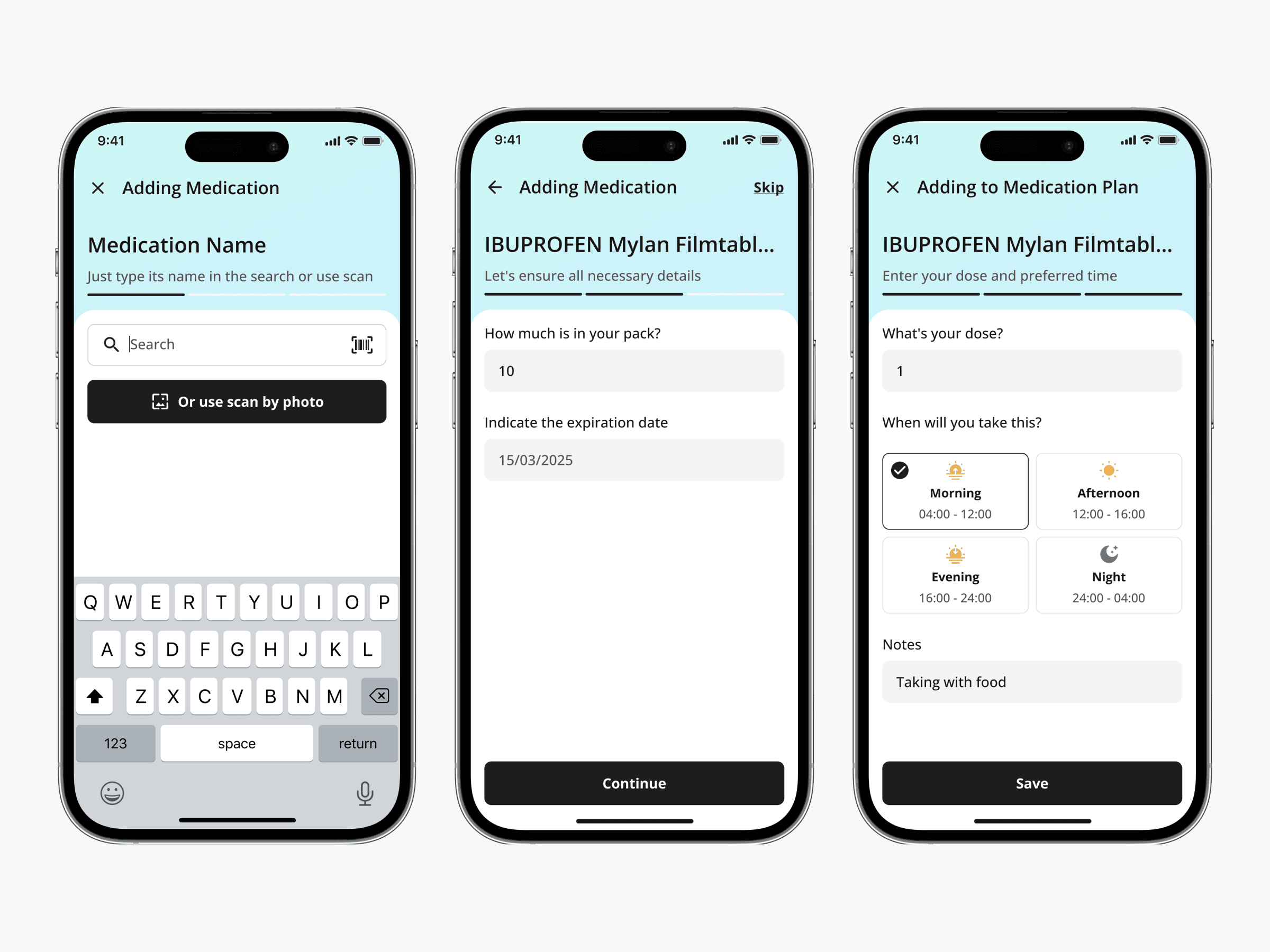
Adding Medication:
Adding Medication provides users with three easy ways to add medications to their medication cabinet.
Whether searching directly from the drug directory, scanning a barcode for quick entry, or using photo recognition for added convenience, this feature makes managing medication easier.
Users can quickly add their medication with accurate drug information, ensuring their medication cabinet is always up-to-date and easy to manage.
Adding Medication provides users with three easy ways to add medications to their medication cabinet.
Whether searching directly from the drug directory, scanning a barcode for quick entry, or using photo recognition for added convenience, this feature makes managing medication easier.
Users can quickly add their medication with accurate drug information, ensuring their medication cabinet is always up-to-date and easy to manage.
Adding Medication:
Adding Medication:
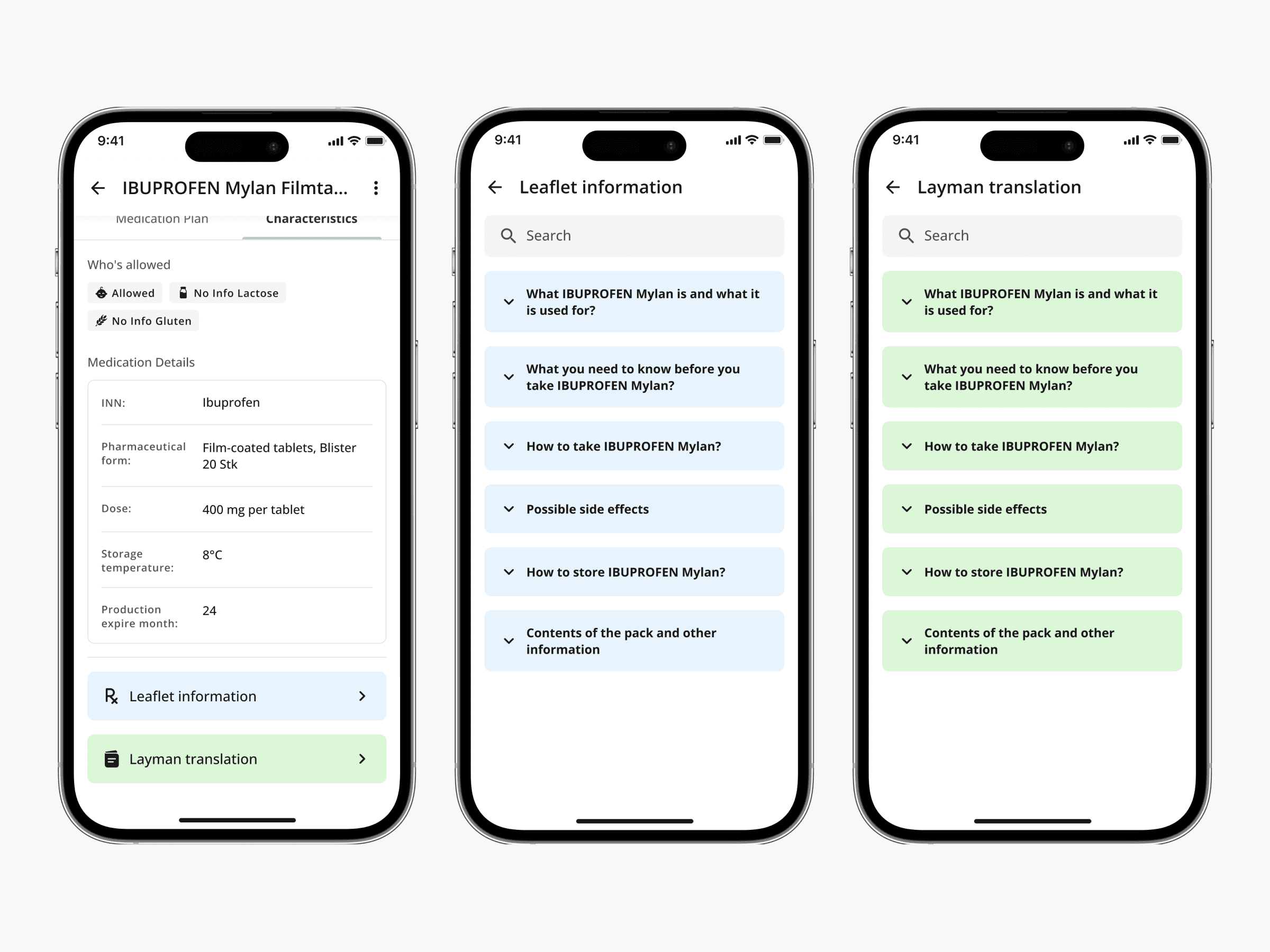
Medication information:
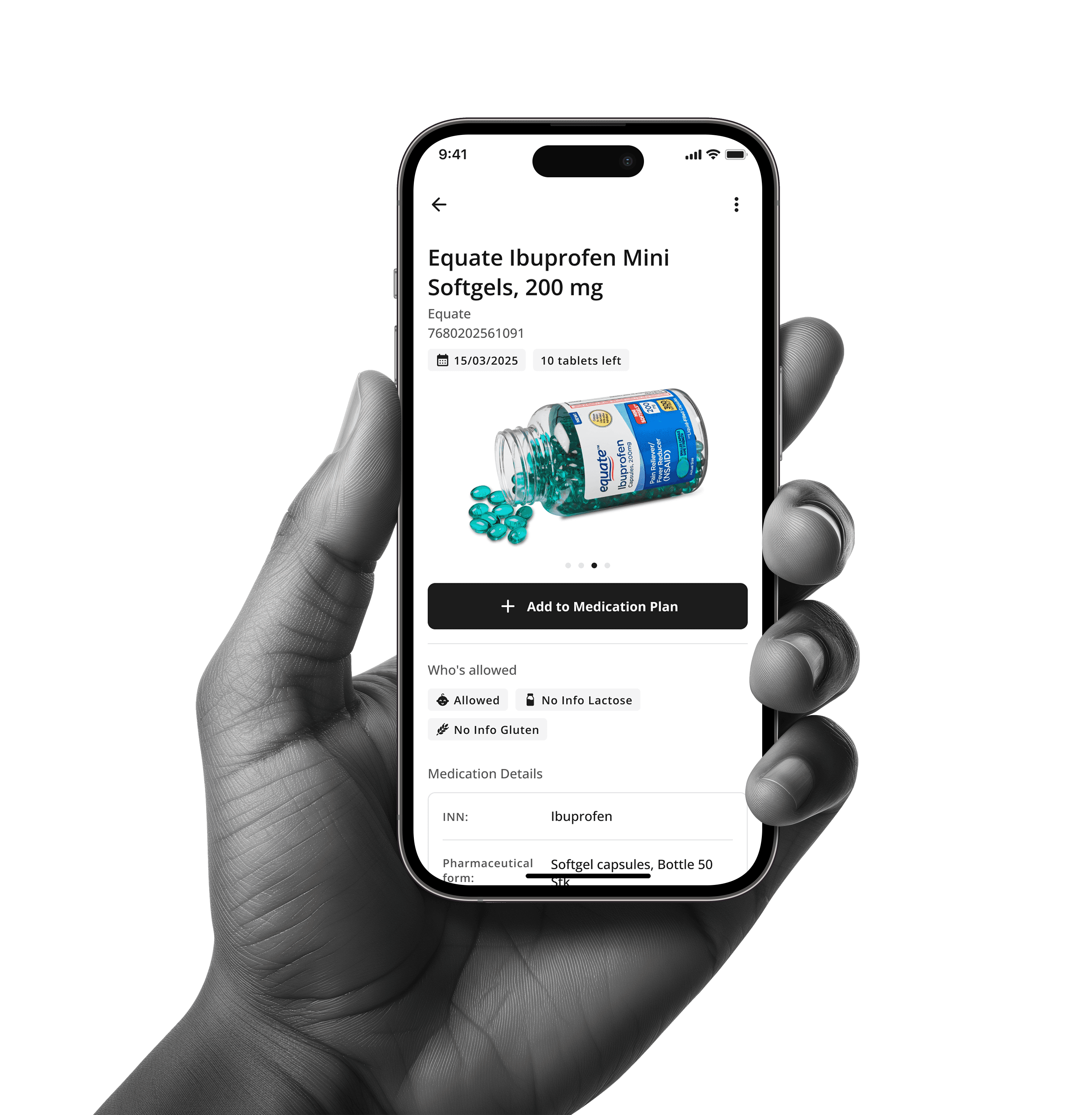
The Medication card provides users with key details about their medication. It includes basic drug information along with the Leaflet Information and Layman Translation functions. These features make drug instructions easier to understand, regardless of medical knowledge. The Layman Translation simplifies complex terms, helping users read and follow instructions with ease, ensuring safe and informed medication management.
The Medication card provides users with key details about their medication. It includes basic drug information along with the Leaflet Information and Layman Translation functions. These features make drug instructions easier to understand, regardless of medical knowledge. The Layman Translation simplifies complex terms, helping users read and follow instructions with ease, ensuring safe and informed medication management.
Medication information:
Medication information:
Medication sharing:
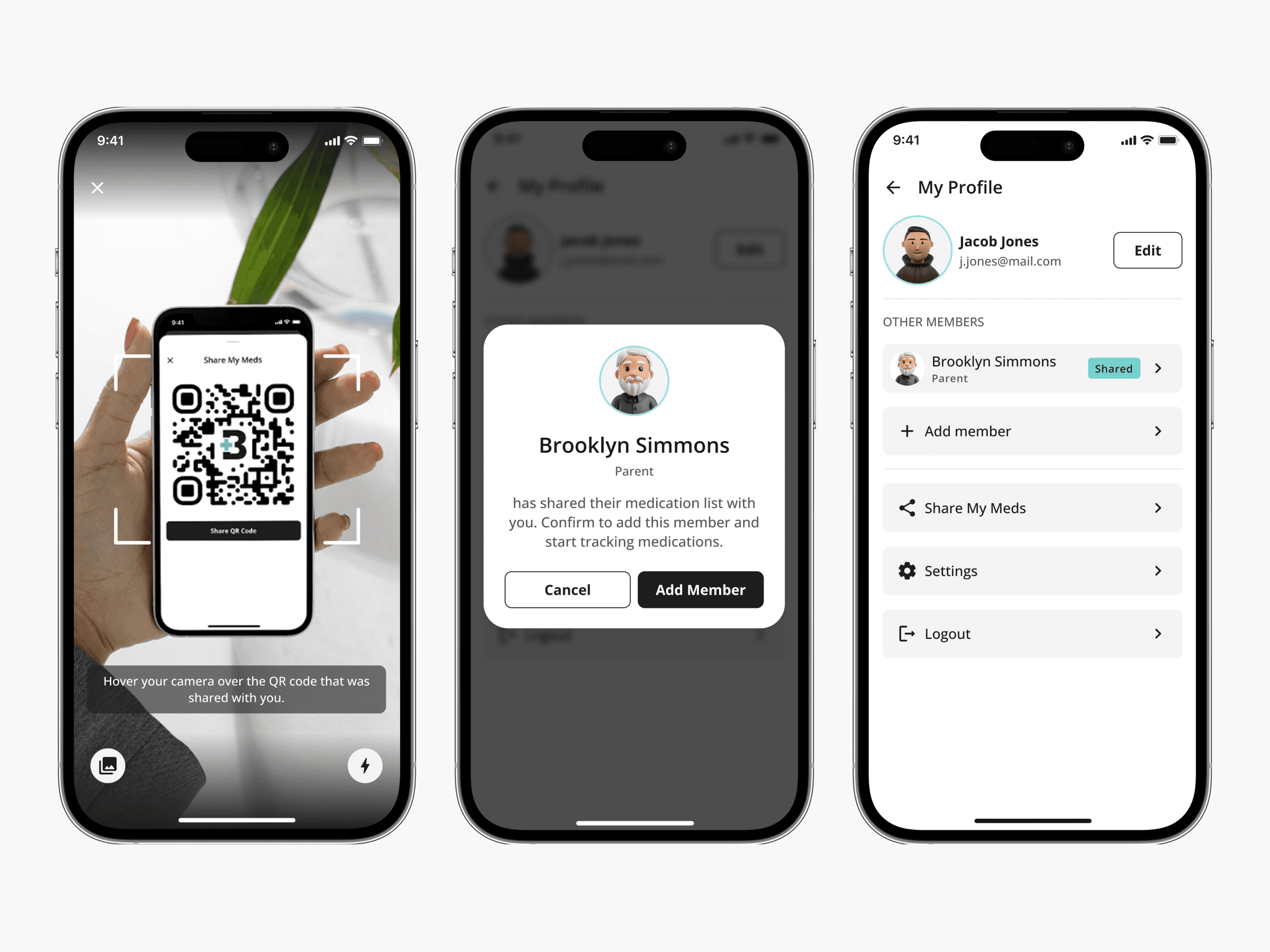
The Medication Sharing feature allows users to share their medication list with family members, friends, caregivers, or anyone else who needs to stay informed.
Alternatively, users can add another person’s profile to the app instead of sharing the list directly. Depending on the permissions the other user has, they can view or edit the list, which makes it easy to track medications, manage treatment plans, or simply monitor the user's medication routine.
The Medication Sharing feature allows users to share their medication list with family members, friends, caregivers, or anyone else who needs to stay informed.
Alternatively, users can add another person’s profile to the app instead of sharing the list directly. Depending on the permissions the other user has, they can view or edit the list, which makes it easy to track medications, manage treatment plans, or simply monitor the user's medication routine.
Medication sharing:
Medication sharing:
Dark mode:
Dark mode:
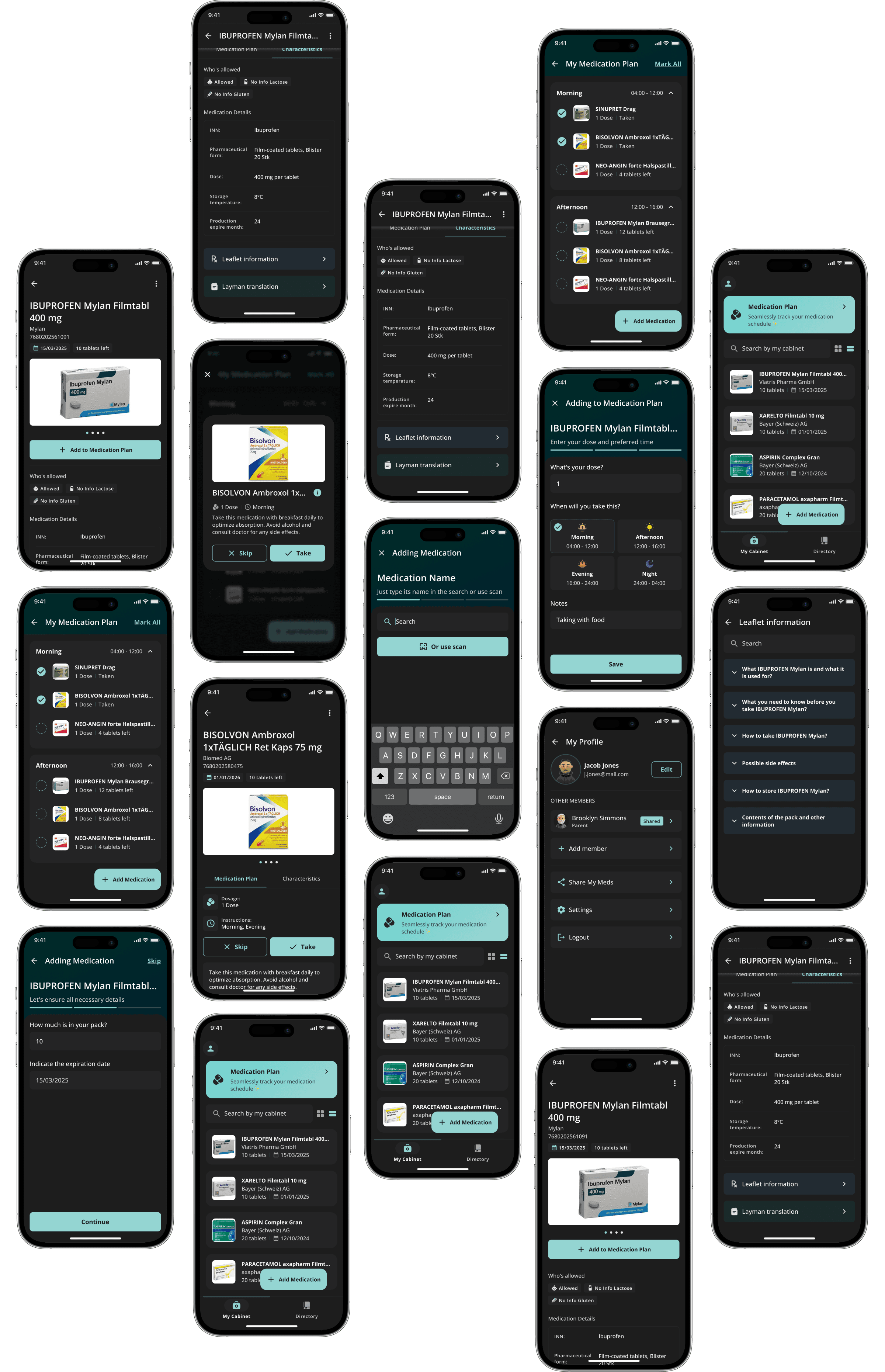
The app also has a dark theme that makes it easy to use in low-light conditions. The colours, icons and text are all easy to see and read, just like the light theme.
To make the design process easier, I used variables in Figma. This meant that the design would look the same on all screens. It also made it easier to update the design in the future. This approach makes sure that the experience is the same whether it is set to dark or light mode.
The app also has a dark theme that makes it easy to use in low-light conditions. The colours, icons and text are all easy to see and read, just like the light theme.
To make the design process easier, I used variables in Figma. This meant that the design would look the same on all screens. It also made it easier to update the design in the future. This approach makes sure that the experience is the same whether it is set to dark or light mode.
Reflection
Reflection
Working on the Medicine Cabinet App has been really good, especially because it helps people manage their medications in a simple and efficient way.
As an MVP, our main focus was to make sure users can easily log, track, and manage their medications, expiration dates, and instructions, all in one place. The idea was to keep things as simple as possible, so users don't have to deal with unnecessary steps or complexity.
In general, this project taught me how important it is to design a solution that works for people with different needs and levels of tech experience. I'm really proud of how the MVP turned out, and I'm excited to see how it will evolve to make managing health at home even easier.
Working on the Medicine Cabinet App has been really good, especially because it helps people manage their medications in a simple and efficient way.
As an MVP, our main focus was to make sure users can easily log, track, and manage their medications, expiration dates, and instructions, all in one place. The idea was to keep things as simple as possible, so users don't have to deal with unnecessary steps or complexity.
In general, this project taught me how important it is to design a solution that works for people with different needs and levels of tech experience. I'm really proud of how the MVP turned out, and I'm excited to see how it will evolve to make managing health at home even easier.